为构建并部署在Docker容器中的FastAPI应用设计一个离线的软件许可证颁发方案。
前言 FastAPI是一个现代、快速(高性能)的Web框架,用于基于标准Python类型提示构建API。
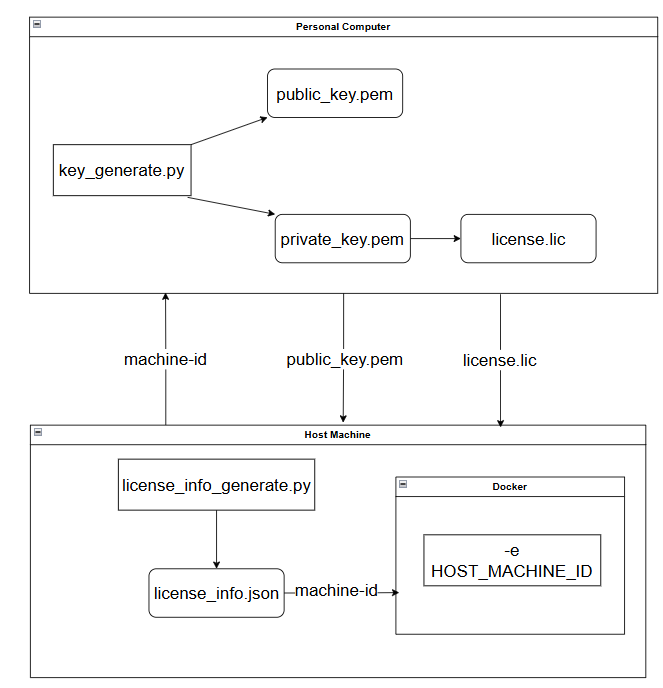
许可证生成架构图 基本流程 私钥与公钥生成 使用非对称加密算法,生成一组私钥和公钥。其中私钥用于生成License.lic,用户的FastAPI应用里只用公钥验证,整个过程完全离线。
1 2 3 4 5 6 7 8 9 10 11 12 13 14 15 16 17 18 19 20 21 22 23 24 25 26 27 28 import osfrom cryptography.hazmat.primitives import serializationfrom cryptography.hazmat.primitives.asymmetric import rsascript_dir = os.path.dirname(os.path.abspath(__file__)) private_key = rsa.generate_private_key(public_exponent=65537 , key_size=2048 ) public_key = private_key.public_key() with open (script_dir + "/private_key.pem" , "wb" ) as f: f.write(private_key.private_bytes( encoding=serialization.Encoding.PEM, format =serialization.PrivateFormat.PKCS8, encryption_algorithm=serialization.NoEncryption() )) with open (script_dir + "/public_key.pem" , "wb" ) as f: f.write(public_key.public_bytes( encoding=serialization.Encoding.PEM, format =serialization.PublicFormat.SubjectPublicKeyInfo ))
运行后你将得到private_key.pem与public_key.pem两个文件。
许可证信息准备 在配置文件license_info.json中配置机器码machine_id和许可证过期时间expire_days。
1
2
3
4
{ "machine_id" : "e29633fade0fc20cbf6a4ff8144f8b09ea97db1e83830e4a9551cef7ae482b94" , "expire_days" : 365 }
其中machine_id可用跨平台机器ID库py-machineid获取。
pip install py-machineid
该库在被调用时,会直接尝试读取宿主机的硬件信息(如Windows注册表、Linux的/etc/machine-id或macOS的硬件序列号)。这部分操作完全由Python代码执行,绕过了Kubernetes的环境注入机制。
为了使py-machineid读取的始终为宿主机的ID,常规方法是通过挂载将宿主机的machine-id文件覆盖容器内的同名文件。例如宿主机为Linux系统,在运行容器时添加-v参数:
docker run -d -v /etc/machine-id:/etc/machine-id:ro your-image:latest
由于不同操作系统文件路径差异较大,最稳妥的方式还是通过环境变量传递machine-id,可在运行容器时添加-e参数:
docker run -d -e HOST_MACHINE_ID="your-actual-host-machine-id-here" your-image:latest
1
2
3
4
5
6
7
8
9
10
11
12
13
14
15
16
17
18
19
20
21
22
23
24
25
import osimport machineidimport hashlibdef get_machine_fingerprint () -> str : env_id = os.environ.get("HOST_MACHINE_ID" ) if env_id: print ("Using machine ID from environment variable" ) return env_id machine_id = machineid.id () hashed_id = machineid.hashed_id('your_app_name' ) print ("Using direct machine ID from system" ) return hashlib.sha256(hashed_id.encode()).hexdigest()
技术人员可使用license_info_generate.py脚本在docker应用程序的宿主机上自动生成license_info.json文件,并用私钥private_key.pem生成对应的软件许可证license.lic颁发给用户。
用户将license.lic文件放在相应目录后,每次FastAPI应用启动时都将使用public_key.pem对其解析并验证,验证过程中同样使用get_machine_fingerprint方法。
1 2 3 4 5 6 7 8 9 10 11 12 13 14 15 16 17 18 19 20 21 22 23 24 25 26 27 import hashlibimport jsonimport osimport machineidscript_dir = os.path.dirname(os.path.abspath(__file__)) def get_machine_fingerprint () -> str : machine_id = get_machine_fingerprint() data = { "machine_id" : machine_id, "expire_days" : 365 , "features" : ["module1" , "module2" , "module3" ] } with open (script_dir + '/license_info.json' , 'w' , encoding='utf-8' ) as f: json.dump(data, f, indent=4 ) print ("license_info.json file generated" )
许可证颁发 使用前面生成的私钥private_key.pem生成license.lic文件,用于后续的FastAPI应用许可验证。
1 2 3 4 5 6 7 8 9 10 11 12 13 14 15 16 17 18 19 20 21 22 23 24 25 26 27 28 29 30 31 32 33 34 35 36 37 38 39 40 41 42 43 44 45 46 47 48 49 50 51 52 53 54 55 56 57 58 59 60 61 import jsonimport base64import osfrom typing import List from cryptography.hazmat.primitives import hashes, serializationfrom cryptography.hazmat.primitives.asymmetric import paddingfrom datetime import datetime, timedelta, timezonescript_dir = os.path.dirname(os.path.abspath(__file__)) def generate_license (customer_machine_id: str , expire_days: int = 365 , features: List [str ] = [] ): with open (script_dir + "/private_key.pem" , "rb" ) as f: private_key = serialization.load_pem_private_key(f.read(), password=None ) payload = { "machine_id" : customer_machine_id, "expire" : (datetime.now(timezone.utc) + timedelta(days=expire_days)).isoformat(), "features" : features } payload_bytes = json.dumps(payload).encode('utf-8' ) signature = private_key.sign( payload_bytes, padding.PKCS1v15(), hashes.SHA256() ) license_data = base64.b64encode(payload_bytes).decode('utf-8' ) license_signature = base64.b64encode(signature).decode('utf-8' ) final_license = f"{license_data} .{license_signature} " print ("This license string is provided to the customer:" ) print (final_license) return final_license def write_license_simple (license_content ): """最简单的写入方式""" with open (script_dir + "/license.lic" , "w" ) as f: f.write(license_content) print ("License file created: license.lic" ) with open (script_dir + '/license_info.json' , 'r' ) as f: config = json.load(f) machine_id = config['machine_id' ] expire_days = config['expire_days' ] features = config['features' ] lic = generate_license(machine_id, expire_days, features) write_license_simple(lic)
应用许可验证 1 2 3 4 5 6 7 8 9 10 11 12 13 14 15 16 17 18 19 20 21 22 23 24 25 26 27 28 29 30 31 32 33 34 35 36 37 38 39 40 41 42 43 44 45 46 47 48 49 50 51 52 53 54 55 56 57 58 59 60 61 62 63 64 65 66 67 68 69 70 import osimport jsonimport base64import hashlibimport machineidfrom datetime import datetime, timezonefrom fastapi import FastAPI, HTTPExceptionfrom cryptography.hazmat.primitives import hashes, serializationfrom cryptography.hazmat.primitives.asymmetric import paddingapp = FastAPI() script_dir = os.path.dirname(os.path.abspath(__file__)) with open (script_dir + "/public_key.pem" , "rb" ) as f: PUBLIC_KEY = serialization.load_pem_public_key(f.read()) import subprocessimport hashlibimport hashlibimport uuiddef get_machine_fingerprint () -> str : def verify_license (license_str: str ): """验证License字符串是否有效、是否过期、是否匹配本机""" try : data_b64, signature_b64 = license_str.split('.' ) payload_bytes = base64.b64decode(data_b64) signature = base64.b64decode(signature_b64) PUBLIC_KEY.verify( signature, payload_bytes, padding.PKCS1v15(), hashes.SHA256() ) payload = json.loads(payload_bytes) expire_time = datetime.fromisoformat(payload["expire" ]) if expire_time < datetime.now(timezone.utc): raise HTTPException(status_code=403 , detail="License is expired" ) current_machine_id = get_machine_fingerprint() print ("current machine id:" + current_machine_id) if payload["machine_id" ] != current_machine_id: raise HTTPException(status_code=403 , detail="The license does not match the current device" ) return payload except Exception as e: raise HTTPException(status_code=403 , detail=f"License validate failed: {str (e)} " ) with open (script_dir + "/license.lic" , "r" ) as f: lic = f.read() print (f"read content: '{lic} '" ) res = verify_license(lic) print (res)
Docker集成测试 demo目录结构如下,
1 2 3 4 5 6 docker ├─ Dockerfile ├─ license.lic ├─ public_key.pem ├─ requirements.txt └─ server_validate.py
其中许可证书license.lic和公钥public_key.pem的生成方式如前文所述,不再赘述。
requirements.txt包含FastAPI运行所需的依赖,本demo示例需要的依赖如下,
1 2 3 4 5 6 fastapi==0.104.1 uvicorn==0.24.0 cryptography==41.0.7 pydantic==2.5.0 python-multipart==0.0.6 py-machineid==1.0.0
server_validate.py是一个简单的FastAPI示例,该应用会自动检查py-machineid依赖库是否加载成功,自动加载许可证书license.lic和公钥public_key.pem
1 2 3 4 5 6 7 8 9 10 11 12 13 14 15 16 17 18 19 20 21 22 23 24 25 26 27 28 29 30 31 32 33 34 35 36 37 38 39 40 41 42 43 44 45 46 47 48 49 50 51 52 53 54 55 56 57 58 59 60 61 62 63 64 65 66 67 68 69 70 71 72 73 74 75 76 77 78 79 80 81 82 83 84 85 86 87 88 89 90 91 92 93 94 95 96 97 98 99 100 101 102 103 104 105 106 107 108 109 110 111 112 113 114 115 116 117 118 119 120 121 122 123 124 125 126 127 128 129 130 131 132 133 134 135 136 137 138 139 140 141 142 143 144 145 146 147 148 149 150 151 152 153 154 155 156 157 158 159 160 161 162 163 164 165 166 167 168 169 170 171 172 173 174 175 176 177 178 179 180 181 182 183 184 185 186 187 188 189 190 191 192 193 194 195 196 197 198 199 200 201 202 203 204 205 206 207 208 209 210 211 212 import jsonimport base64import hashlibimport osfrom datetime import datetime, timezonefrom fastapi import FastAPI, Depends, HTTPException, Requestfrom cryptography.hazmat.primitives import hashes, serializationfrom cryptography.hazmat.primitives.asymmetric import paddingscript_dir = os.path.dirname(os.path.abspath(__file__)) try : import machineid MACHINEID_AVAILABLE = True print ("✓ py-machineid 库加载成功" ) except ImportError: MACHINEID_AVAILABLE = False print ("⚠️ py-machineid 库未安装,将使用备用方案" ) app = FastAPI(title="License Validation Service" ) def load_public_key (): """从文件加载公钥""" public_key_path = script_dir + "/public_key.pem" try : with open (public_key_path, "rb" ) as f: public_key = serialization.load_pem_public_key(f.read()) print ("✓ 公钥加载成功" ) return public_key except Exception as e: print (f"✗ 公钥加载失败: {e} " ) return None PUBLIC_KEY = load_public_key() def load_license (): """从文件加载License""" license_path = script_dir + "/license.lic" try : with open (license_path, "r" ) as f: license_str = f.read().strip() print ("✓ License文件加载成功" ) return license_str except Exception as e: print (f"✗ License文件加载失败: {e} " ) return None LICENSE_STR = load_license() def get_machine_fingerprint () -> str : env_id = os.environ.get("HOST_MACHINE_ID" ) if env_id: print ("Using machine ID from environment variable" ) return env_id machine_id = machineid.id () hashed_id = machineid.hashed_id('vv' ) print ("Using direct machine ID from system" ) return hashlib.sha256(hashed_id.encode()).hexdigest() def verify_license (license_str : str ) -> dict : """验证License并返回授权信息""" if not PUBLIC_KEY: raise HTTPException(status_code=500 , detail="公钥未正确加载" ) try : if '.' not in license_str: raise ValueError("Invalid license format" ) data_b64, signature_b64 = license_str.split('.' ) payload_bytes = base64.b64decode(data_b64) signature = base64.b64decode(signature_b64) PUBLIC_KEY.verify( signature, payload_bytes, padding.PKCS1v15(), hashes.SHA256() ) payload = json.loads(payload_bytes) expire_time = datetime.fromisoformat(payload["expire" ]) current_time = datetime.now(timezone.utc) if expire_time < current_time: raise HTTPException(status_code=403 , detail="License已过期" ) current_fingerprint = get_machine_fingerprint() bound_fingerprint = payload.get("machine_id" ) if bound_fingerprint and current_fingerprint != bound_fingerprint: raise HTTPException( status_code=403 , detail=f"License与当前设备不匹配\n期望: {bound_fingerprint[:32 ]} ...\n实际: {current_fingerprint[:32 ]} ..." ) return payload except HTTPException: raise except Exception as e: raise HTTPException(status_code=403 , detail=f"License验证失败: {str (e)} " ) def get_current_license (request: Request ) -> dict : """从请求中获取并验证License""" license_key = request.headers.get("X-License-Key" ) if not license_key: license_key = request.query_params.get("license_key" ) if not license_key: license_key = LICENSE_STR if not license_key: raise HTTPException(status_code=401 , detail="请提供License (X-License-Key header 或 license_key参数)" ) return verify_license(license_key) @app.get("/" async def root (): """根路径""" return { "service" : "License Validation Service" , "status" : "running" , "version" : "2.0.0" , "machineid_available" : MACHINEID_AVAILABLE } @app.get("/health" async def health_check (): """健康检查接口""" return { "status" : "healthy" , "public_key_loaded" : PUBLIC_KEY is not None , "license_loaded" : LICENSE_STR is not None , "machineid_available" : MACHINEID_AVAILABLE } @app.get("/machine-fingerprint" async def get_fingerprint (): """获取当前机器的指纹(用于生成License)""" fingerprint = get_machine_fingerprint() return { "machine_fingerprint" : fingerprint, "machineid_available" : MACHINEID_AVAILABLE, "note" : "请将此指纹提供给管理员以生成License" } @app.get("/validate" async def validate_license (license_info: dict = Depends(get_current_license ) ): """验证License接口""" return { "valid" : True , "message" : "License验证通过" , "license_info" : { "machine_id" : license_info.get("machine_id" , "" ), "expire_days" : license_info.get("expire" ), "features" : license_info.get("features" ) } } @app.get("/protected" async def protected_endpoint (license_info: dict = Depends(get_current_license ) ): """受保护的API示例""" return { "message" : "访问成功!" , "license_valid" : True , "expires_at" : license_info.get("expire" ) } if __name__ == "__main__" : import uvicorn print ("=" * 50 ) print ("License Validation Service Starting..." ) print (f"Public Key: {'✓ Loaded' if PUBLIC_KEY else '✗ Failed' } " ) print (f"License: {'✓ Loaded' if LICENSE_STR else '✗ Not found' } " ) print (f"py-machineid: {'✓ Available' if MACHINEID_AVAILABLE else '✗ Not installed' } " ) print (f"Machine Fingerprint: {get_machine_fingerprint()[:48 ]} ..." ) print ("=" * 50 ) uvicorn.run(app, host="0.0.0.0" , port=8000 )
Dockerfile文件如下,使用命令docker build -t your-image:latest .以构建镜像,
使用命令docker run -d -e HOST_MACHINE_ID="your-actual-host-machine-id-here" --name your-image -p 8000:8000 your-image:latest 以创建并运行容器,同时传入环境变量HOST_MACHINE_ID
1 2 3 4 5 6 7 8 9 10 11 12 13 14 15 16 17 18 19 20 21 22 23 24 25 26 27 28 29 30 31 32 33 34 35 36 37 38 39 40 41 42 FROM python:3.11 -slimWORKDIR /app ENV PYTHONDONTWRITEBYTECODE=1 \ PYTHONUNBUFFERED=1 \ TZ=Asia/Shanghai RUN apt-get update && \ apt-get install -y --no-install-recommends \ gcc \ && rm -rf /var/lib/apt/lists/* COPY requirements.txt . RUN pip install --no-cache-dir -r requirements.txt COPY server_validate.py . COPY public_key.pem . COPY license.lic . RUN useradd -m -u 1000 appuser && \ chown -R appuser:appuser /app USER appuserEXPOSE 8000 HEALTHCHECK --interval=30s --timeout =3s --start-period=5s --retries=3 \ CMD python -c "import requests; requests.get('http://localhost:8000/health')" || exit 1 CMD ["uvicorn" , "server_validate:app" , "--host" , "0.0.0.0" , "--port" , "8000" ]
使用curl命令curl http://localhost:8000/machine-fingerprint测试获取机器指纹(若容器启动时未添加环境变量,则获取的为容器的ID而非宿主机)。
使用curl命令curl http://localhost:8000/validate测试校验许可证是否有效(许可证机器指纹与宿主机一致,且未过有效期)。
也可以使用curl命令curl http://localhost:8000/validate?license_key="your-license-key" 从请求中获取并验证License。
参考文档