基于python HTTPServer的客户端服务实现
Jocoboy

基于python的HTTPServer实现一个客户端服务,并借助TCL脚本实现服务监听过程的可视化。

前言

Python的http.server库是基于socket构建的,http.server模块中的核心类HTTPServer,实际上是socketserver.TCPServer的一个子类。TCPServer负责处理底层的TCP连接,因此http.server可以看作是对底层socket通信和HTTP协议解析的一个高层封装,借此可以方便地搭建一个Web服务器,而不必直接处理复杂的socket细节。

TCL脚本语言(Tool Command Language)是一种简单、通用且可扩展的脚本语言,因其易于学习和强大的功能,被广泛应用于自动化测试、嵌入式系统、GUI开发等领域。Tcl在多个领域都有广泛应用:常用于编写自动化测试脚本,可以通过exec命令调用外部程序(如 Python 脚本)来协同完成复杂任务;常用于嵌入式系统与GUI开发,与Tk工具包一起使用,用于快速创建跨平台的图形用户界面。

实现细节

客户端服务

基于HTTPServer实现一个简单的python客户端服务,监听特定端口的特定请求。

1
2
3
4
5
6
7
8
9
10
11
12
13
14
15
16
17
18
19
20
21
22
23
24
25
26
27
28
29
30
31
32
33
34
35
36
37
38
39
40
41
42
43
44
45
46
47
48
49
50
51
52
53
54
55
56
57
58
59
60
61
62
63
64
65
66
67
68
69
70
71
72
73
74
75
76
77
78
79
80
81
82
83
84
85
86
87
88
89
90
91
92
93
94
95
96
97
98
99
100
101
102
103
104
105
106
107
108
109
110
111
112
113
114
115
116
117
118
119
120
121
122
123
124
125
126
127
128
129
130
131
132
133
# http_server.py
from http.server import HTTPServer, BaseHTTPRequestHandler
import json
from pathlib import Path
from datetime import datetime

class RequestHandler(BaseHTTPRequestHandler):
"""自定义请求处理器"""

# 存储请求的类变量
requests_log = []

def log_request_info(self):
"""记录请求信息"""
content_length = int(self.headers.get('Content-Length', 0))
body = self.rfile.read(content_length).decode('utf-8') if content_length > 0 else None

request_info = {
'timestamp': datetime.now().isoformat(),
'method': self.command,
'path': self.path,
'headers': dict(self.headers),
'body': body
}

RequestHandler.requests_log.append(request_info)

print(f"\n[{datetime.now().strftime('%Y-%m-%d %H:%M:%S')}] 收到请求:")
print(f" 方法: {self.command}")
print(f" 路径: {self.path}")
if body:
print(f" 数据: {body}")

return body

def send_response_json(self, data, status=200):
"""发送JSON响应"""
self.send_response(status)
self.send_header('Content-Type', 'application/json')
self.end_headers()
self.wfile.write(json.dumps(data, ensure_ascii=False).encode('utf-8'))


def do_POST(self):
"""处理POST请求"""
if self.path == '/push_parameters':
# 获取请求体
body = self.log_request_info()

# 验证必要参数
if not body or 'parameters' not in body:
self.send_response_json({
'code': 400,
'message': 'Missing required parameter: parameters',
'status': 'error'
}, 400)
return

try:
# 获取参数
data = json.loads(body)
parameters = data['parameters']
id = data['id']

# 处理其他业务逻辑
token = self.get_token()
path = Path(r"C:\Users\Administrator\Documents")
target_file = f"{id}.csv"
file_path = path / target_file
self.upload_file(token, file_path)

# 返回成功响应(与前台期望的格式一致)
self.send_response_json({
'code': 200,
'message': 'Parameters pushed successfully',
'status': 'success',
'data': {
'parameters': parameters,
'id': id
}
})

except ValueError as e:
# 参数格式错误
self.send_response_json({
'code': 400,
'message': f'Invalid parameter format: {str(e)}',
'status': 'error'
}, 400)

except Exception as e:
# 其他服务端错误
self.send_response_json({
'code': 500,
'message': f'Internal server error: {str(e)}',
'status': 'error'
}, 500)

else:
# 路径不存在
self.send_response_json({
'code': 404,
'message': 'Not found',
'status': 'error'
}, 404)

@staticmethod
def get_token():
pass

@staticmethod
def upload_file(token, file_path):
pass


def run_server(port=8080):
"""启动服务器"""
server_address = ('', port)
httpd = HTTPServer(server_address, RequestHandler)
print(f"服务器已启动,监听端口: {port}")
print(f"访问地址: http://localhost:{port}")
print("\n可用端点:")
print(" POST /push_parameters- 接收参数")
print("\n按 Ctrl+C 停止服务\n")

try:
httpd.serve_forever()
except KeyboardInterrupt:
print("\n服务已停止")
httpd.server_close()

if __name__ == '__main__':
run_server(8777)

客户端服务测试代码如下

1
2
3
4
5
6
7
8
9
10
11
12
13
14
15
16
17
18
19
# client.py

import httpx

# 服务端地址
BASE_URL = 'http://localhost:8777'

if __name__ == '__main__':
# 发送不同类型的请求
try:
url = f"{BASE_URL}/push_parameters"
request_data = {"parameters": {}}
request_data["id"] = "Test-1"

response = httpx.post(url, json=request_data, timeout=300)
response.raise_for_status()
result = response.json()
except Exception as e:
print(f"Error: {str(e)}")

监听可视化

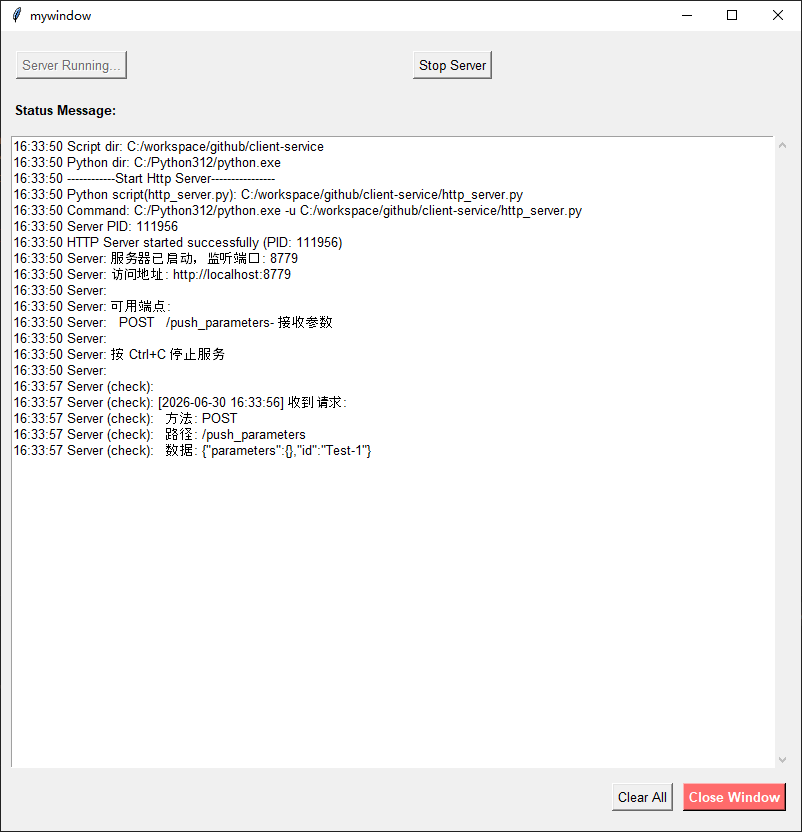
基于Tcl/Tk脚本实现一个客户端服务监听过程的可视化界面。

1
2
3
4
5
6
7
8
9
10
11
12
13
14
15
16
17
18
19
20
21
22
23
24
25
26
27
28
29
30
31
32
33
34
35
36
37
38
39
40
41
42
43
44
45
46
47
48
49
50
51
52
53
54
55
56
57
58
59
60
61
62
63
64
65
66
67
68
69
70
71
72
73
74
75
76
77
78
79
80
81
82
83
84
85
86
87
88
89
90
91
92
93
94
95
96
97
98
99
100
101
102
103
104
105
106
107
108
109
110
111
112
113
114
115
116
117
118
119
120
121
122
123
124
125
126
127
128
129
130
131
132
133
134
135
136
137
138
139
140
141
142
143
144
145
146
147
148
149
150
151
152
153
154
155
156
157
158
159
160
161
162
163
164
165
166
167
168
169
170
171
172
173
174
175
176
177
178
179
180
181
182
183
184
185
186
187
188
189
190
191
192
193
194
195
196
197
198
199
200
201
202
203
204
205
206
207
208
209
210
211
212
213
214
215
216
217
218
219
220
221
222
223
224
225
226
227
228
229
230
231
232
233
234
235
236
237
238
239
240
241
242
243
244
245
246
247
248
249
250
251
252
253
254
255
256
257
258
259
260
261
262
263
264
265
266
267
268
269
270
271
272
273
274
275
276
277
278
279
280
281
282
283
284
# main.tcl

package require Tk

set ::SCRIPT_DIR [file dirname [file normalize [info script]]]
# 切换到脚本目录(重要!)
cd $::SCRIPT_DIR

# 创建顶级窗口(作为子窗口,不影响宿主程序)
set main_window [toplevel .mywindow]
wm title . "Tcl/Tk File Selector"
wm geometry . "800x800"
wm resizable $main_window 1 1

# 设置最小和最大尺寸(可选)
wm minsize $main_window 800 800
wm maxsize $main_window 800 800

# 创建框架用于布局
frame $main_window.main -padx 10 -pady 10
pack $main_window.main -fill both -expand true

# 创建第一行按钮
button $main_window.main.start_server_btn -text "Start Server" -command start_server_action -font {Arial 10}
grid $main_window.main.start_server_btn -row 1 -column 0 -pady 10 -padx 5
button $main_window.main.stop_server_btn -text "Stop Server" -command stop_server_action -font {Arial 10}
grid $main_window.main.stop_server_btn -row 1 -column 1 -pady 10 -padx 5

# 创建显示消息的区域(用于显示操作结果)
label $main_window.main.message_label -text "Status Message:" -font {Arial 10 bold}
text $main_window.main.message_text -width 70 -height 5 -wrap word -font {Arial 10} \
-yscrollcommand "$main_window.main.scrollbar set" -state normal
scrollbar $main_window.main.scrollbar -orient vertical -command "$main_window.main.message_text yview"

grid $main_window.main.message_label -row 3 -column 0 -columnspan 4 -sticky w -pady 10
grid $main_window.main.message_text -row 4 -column 0 -columnspan 3 -sticky nsew -pady 5
grid $main_window.main.scrollbar -row 4 -column 3 -sticky ns -pady 5

# 创建底部按钮框架
frame $main_window.main.bottom_frame -pady 10
grid $main_window.main.bottom_frame -row 5 -column 0 -columnspan 4 -sticky ew

# 添加关闭窗口按钮(销毁这个toplevel窗口)
button $main_window.main.bottom_frame.close_btn -text "Close Window" -command close_window -font {Arial 10 bold} \
-bg "#ff6b6b" -activebackground "#ff5252" -fg white
pack $main_window.main.bottom_frame.close_btn -side right -padx 5

# 添加"清空所有"按钮
button $main_window.main.bottom_frame.clear_all_btn -text "Clear All" -command clear_all_action -font {Arial 10}
pack $main_window.main.bottom_frame.clear_all_btn -side right -padx 5

# 配置网格权重,使组件可伸缩
grid columnconfigure $main_window.main 1 -weight 1
grid rowconfigure $main_window.main 4 -weight 1

# 全局变量
global server_pipe server_pid

proc start_server_action {} {
set start_server_btn ".mywindow.main.start_server_btn"
$start_server_btn configure -state disabled -text "Server Running..."
update idletasks

after 100 {
catch {
if {[catch {
set SCRIPT_DIR [file dirname [file normalize [info script]]]
add_message "Script dir: $SCRIPT_DIR"

set system_dir [file dirname [file normalize [info library]]]
# set py_exe [file join [file dirname [file dirname $system_dir]] "python" "python.exe"]
set py_exe [file join "C:\\" "Python312" "python.exe"]
add_message "Python dir: $py_exe"

add_message "------------Start Http Server----------------"

set py_script_http_server [file join $SCRIPT_DIR "http_server.py"]
add_message "Python script(http_server.py): $py_script_http_server"

set py_exe [file normalize $py_exe]

# 使用 -u 参数禁用Python缓冲
set cmd [list $py_exe -u $py_script_http_server]
add_message "Command: $cmd"

# 使用管道启动
set pipe [open "|$cmd" r]
fconfigure $pipe -blocking 0 -buffering none -encoding gb2312

# 获取进程ID(Windows和Unix通用)
set pid [pid $pipe]
add_message "Server PID: $pid"

# 保存到全局变量
global server_pipe server_pid
set server_pipe $pipe
set server_pid $pid

# 设置文件事件读取输出
fileevent $pipe readable [list read_server_output $pipe]

add_message "HTTP Server started successfully (PID: $pid)"

# 启动定时器检查输出(备用方案)
after 1000 [list check_server_output $pipe]

} err]} {
add_message "Error: $err"
if {[info exists errorInfo]} {
add_message "Error Details: $errorInfo"
}
}
} result

}
}

# 读取服务器输出
proc read_server_output {pipe} {
if {[eof $pipe]} {
fileevent $pipe readable {}
catch {close $pipe}
add_message "Server process ended"
global server_pipe server_pid
set server_pipe ""
set server_pid ""
return
}

# 尝试读取所有可用数据
while {[gets $pipe line] >= 0} {
add_message "Server: $line"
}

# 如果有错误输出,也读取
if {[catch {gets $pipe line} result]} {
if {$result >= 0} {
add_message "Server (stderr): $line"
}
}
}

# 备用方案:定时检查输出
proc check_server_output {pipe} {
if {![info exists pipe] || $pipe eq ""} {
return
}

# 检查管道是否还活着
if {[catch {fileevent $pipe readable {}}]} {
return
}

# 尝试读取数据
catch {
while {[gets $pipe line] >= 0} {
add_message "Server (check): $line"
}
}

# 继续检查
after 1000 [list check_server_output $pipe]
}

# 真正停止服务器
proc stop_server_action {} {
global server_pipe server_pid

if {[info exists server_pid] && $server_pid ne ""} {
add_message "Stopping HTTP Server (PID: $server_pid)..."

# 根据操作系统选择终止方式
if {[string equal $::tcl_platform(platform) "windows"]} {
# Windows: 使用 taskkill 终止进程树
catch {
exec taskkill /F /T /PID $server_pid
add_message "Server process terminated (Windows)"
} err
} else {
# Unix/Linux: 使用 kill
catch {
exec kill -9 $server_pid
add_message "Server process terminated (Unix)"
} err
}

# 关闭管道
if {[info exists server_pipe] && $server_pipe ne ""} {
catch {
close $server_pipe
}
}

set server_pipe ""
set server_pid ""

# 更新UI
set start_server_btn ".mywindow.main.start_server_btn"
if {[winfo exists $start_server_btn]} {
$start_server_btn configure -state normal -text "Start Server"
}

add_message "HTTP Server stopped"
} else {
add_message "No server running"
}


set start_server_btn ".mywindow.main.start_server_btn"
$start_server_btn configure -state normal -text "Start Server"
}


# 关闭窗口函数(只销毁toplevel,不影响宿主程序)
proc close_window {} {
# 直接使用窗口路径,不依赖全局变量
set window_path ".mywindow"

# 询问确认
set result [tk_messageBox -title "Confirm Exit" -message "Are you sure to exit?" \
-icon question -type yesno -default no -parent $window_path]

if {$result == "yes"} {
# 只销毁toplevel窗口,不影响主解释器和宿主程序
if {[winfo exists $window_path]} {
destroy $window_path
# 可选:添加日志或通知宿主程序
}
}
}

# 清空所有内容(输入框、文件选择、消息区域)
proc clear_all_action {} {
global selected_file

set window_path ".mywindow"

# 检查窗口是否存在
if {![winfo exists $window_path]} {
return
}

# 清空消息区域
$window_path.main.message_text delete 1.0 end

# 添加清空完成消息
add_message "All Content Cleared"
}

# 添加消息到消息区域
proc add_message {msg} {
set window_path ".mywindow"

# 检查窗口是否还存在
if {[winfo exists $window_path]} {
$window_path.main.message_text insert end "[clock format [clock seconds] -format {%H:%M:%S}] $msg\n"
$window_path.main.message_text see end
}
}

# 绑定窗口关闭事件(点击窗口右上角的X按钮)
wm protocol $main_window WM_DELETE_WINDOW {
set result [tk_messageBox -title "Confirm Exit" -message "Are you sure to exit?" \
-icon question -type yesno -default no -parent .mywindow]
if {$result == "yes"} {
if {[winfo exists .mywindow]} {
destroy .mywindow
}
}
}

# 启动主循环
# 判断是否在独立运行还是在嵌入环境
if {[info exists ::argv0] && [file tail $::argv0] == [file tail [info script]]} {
# 独立运行,启动事件循环
vwait forever
} else {
# 嵌入环境,只更新一次界面
update
}

# 确保窗口显示在最前
raise $main_window
focus $main_window

实现效果

切换到main.tcl目录下,使用命令tclsh main.tcl启动窗口,点击Start Server启动客户端服务,运行使用命令python client.py模拟服务请求。

参考文档

Powered by Hexo & Theme Keep
This site is deployed on